
DESIGN THINKING
Image above retrieved from: https://www.sketchup.com/
This week will focus on Sketchup and how 3D design software can foster creativity in both educators and students.
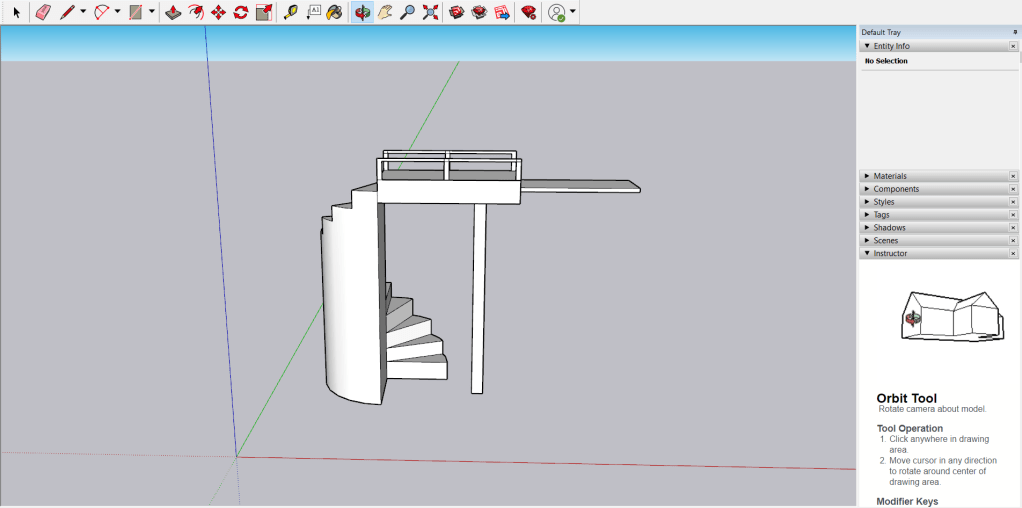
What is 3D design software?
3D design software like Sketchup enable the creation of 3-Dimensional objects through various tools shown in the image above (Sketchup, 2020). Students can utilise this tool to design vast amounts of 3D objects that can be used for architecture, video games, film and engineering. These objects enable students to conceptualise ideas through visualisation and to move beyond pen and paper to think critically and creatively (Kwon, 2017; Laurillard, 2012).
Why design?
As IDEO, (2012) states design thinking is crucial for educators as they are constantly designing lessons, planning and creating to help enrich and enhance learning for their students. However students can also benefit from the development of design skills for their future as they can work along side their teachers to ideate, critically think and problem solve when faced with challenges in the world (IDEO, 2012). As Kwon, (2017) would state, the world is constantly in a state of change and the skills that come from design are invaluable in the technology filled future.
IDEO, (2012) portrays design thinking as a constantly improving procedure both teachers and students can take to achieve a positive impact on the challenges of the world. These procedures include:
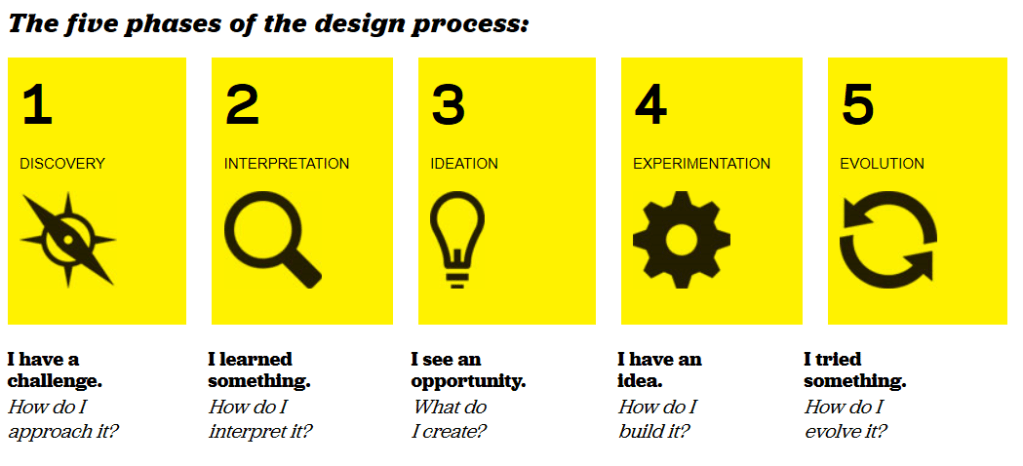
And through these procedure, the crucial thinking skills are developed and fostered both in educators and students going into the ever evolving and forward thinking 21st century (IDEO, 2012). Tools like Sketchup can provide teachers with ways to engage students with the curriculum and to develop these design skills needed for the 21st century. Research from Kwon, (2017) has shown that 3D design software and 3D printing paired together as activities for a class proved to be effective in creating motivation, engagement, and valuable thinking skills for many subject areas such as science, technology, engineering, and maths.
By following the 5 steps of the design process, students can utilise Sketchup to design solutions to problems and keep improving upon each iteration (IDEO, 2012). These same skills can apply to teachers when designing lessons for their students (Kwon, 2017; Laurillard, 2012).
The Challenges
The main challenges with implementing design thinking in the classroom is the need for teachers to align these tasks with the curriculum and a school’s willingness to change. Many schools have cemented the high stakes testing culture into their systems and change can be difficult (Koh, Chai, Wong, & Hong, 2015). The other major issue is the need for scaffolding for both teachers and students as designing is mentally demanding and most are unsure of the proper way to implement tasks to foster the creativity and design thinking skills (Koh et al., 2015).
Reference List
IDEO (2012). Design Thinking for Educators (2nd Edition).
Koh, J., Chai, Ching Sing, Wong, Benjamin, Hong, Huang-Yao, SpringerLink, & SpringerLINK ebooks – Humanities, Social Sciences Law. (2015). Design Thinking for Education : Conceptions and Applications in Teaching and Learning / by Joyce Hwee Ling Koh, Ching Sing Chai, Benjamin Wong, Huang-Yao Hong.
Kwon, H. (2017). Effects of 3D Printing and Design Software on Students’ Overall Performance. Journal of STEM Education : Innovations and Research, 18(4), 37-42.
Laurillard, D. (2012). Teaching as a Design Science: Building Pedagogical Patterns for Learning and Technology. Routledge.
Sketchup. (2020). 3D Design Software. Retrieved from: https://www.sketchup.com/
 EDUC3620 Digital Creativity and Learning
Leave a comment