Blog Feed

EDUC3620 Task 1 blog post

Emerging Technology: Augmented reality (AR)

Image above retrieved from: https://www.businessinsider.com.au/5g-help-retailers-shopping-augmented-reality-2019-8?r=US&IR=T

Augmented reality applications in the classroom

Augmented reality (AR) is an emerging technology that can bring immersive experiences and new possibilities of learning to a classroom (Wu, Lee, Chang and Liang, 2013). This blog will introduce what augmented reality (AR) is and how it can be used in the classroom for enhanced learning experiences and creativity fostering.

What is AR?

Augmented reality (AR) is a form of visual enhancement to the real world by blending virtual information with the physical parts of the world. Torres and Statti, (2018) describe it as tool that can impact the way the natural world is perceived and can provide meaningful enrichment to learning experiences in the classroom. It can provide an immersive experience for students and foster motivation toward achieving and creating their own work (Torres & Statti, 2018).

Fostering Creativity with AR

Augmented reality can not only enhance the experience of our learners but effective use of it can also help foster creativity. Wheeler, Waite and Bromfield, (2002) convey the idea that creativity can be fostered with ICT by enabling them to think and problem solve outside of conventional ways. To achieve this students are to be provided with a balance of structure and unstructured activities to allow for some direction whilst also allowing independent thinking (Wheeler et al., 2002). For the example shown in the image students are able to upload their own images to the application OSMO, (2020) and play the game by matching words to what the image represents. Students are given instructions however they can be creative with their images and answers that they would want to provide. The images can also represent abstract ideas which can help students visualise concepts that they otherwise may be not too familiar with (Torress & Statti, 2018).
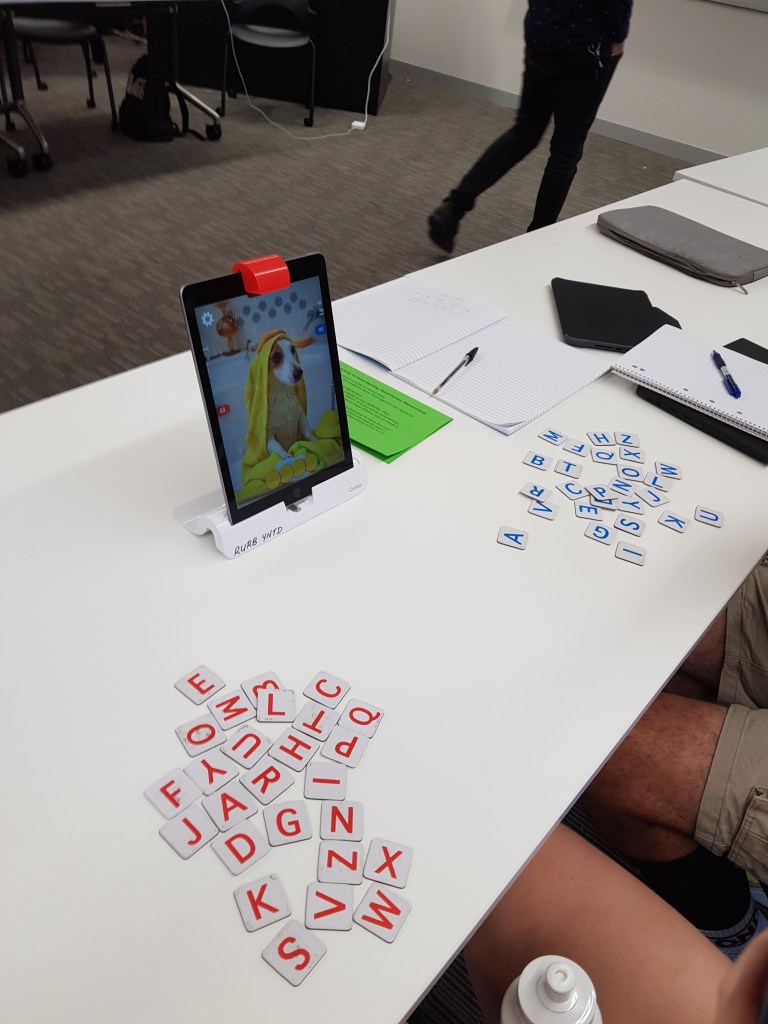
Image by Jiacheng Lin

Challenges of AR

With new technologies emerging in the 21st century, they can bring many benefits to teaching and learning however there are still challenges that need to be addressed with utilising technology such as AR. Toress and Statti, (2018) claims the main challenges for Augmented reality is the accessibility of these tools as teachers need to be aware of students with disability when incorporating these technologies in the classroom and design a task that is inclusive. Other issues also include how teachers are to approach this technology and effectively implement them into the classroom (Wu et al., 2013). Some teachers are also resistant to the idea of incorporating this into their framework and students also require the skills and competencies needed to participate in the cognitive overloading ICT related tasks (Wu et al., 2013).

However even with the challenges the technology of AR is still developing and many agree that the potential for enhancement of learning is there to harness (Wu et al., 2013).

Reference List

OSMO (2020). Transforming how children learn. Retrieved from: https://www.playosmo.com/en/

Reyes Ruiz, G., & Hernandez Hernandez, Marisol. (2018). Augmented reality for enhanced learning environments / Gerardo Reyes Ruiz and Marisol Hernandez Hernandez.

Torres, K., & Statti, A. (2018). Enhancing Learning and Professional Development Outcomes Through Augmented Reality. In Augmented Reality for Enhanced Learning Environments (pp. 58-72).

Wu, H., Lee, S., Chang, H., & Liang, J. (2013). Current status, opportunities and challenges of augmented reality in education. Computers & Education, 62(C), 41-49.

Featured post

Week 9: Constructionism

Constructionism

Above image from: https://classroom.littlebits.com/projects/rc-car-0c993f0b-d422-4071-9590-7e1d04937638

This week the theory of constructionism will be explored and how learning through doing is achieved.

Why Constructionism?

Donaldson, (2014) claims that learning is an active process whereby firsthand experiences are used to construct meaning, ideas and knowledge and is what shapes our understanding of the world. Additionally, when meaningful experiences become personal, the construction of new knowledge will be enhanced (Donaldson, 2014). For example, when students are allowed to create, design or construct products such as robots or other crafts, a personal connection to that product is formed and the process becomes engaging to them (Donaldson, 2014).

The theory has spawned a movement around making as a way to effectively learn in schools which is named the ‘The maker movement’ (Martinez and Stager, 2014). Martinez and Stager, (2014) advocate for the potential of learning through creation and encourages schools to go beyond the textbook and standardised ways of learning. The movement views students as capable and competent learners who can create and construct materials, objects, code, programs, etc. Martinez and Stager, (2014) state that students should be able to enjoy and become lost in the process of making projects and this will in turn enable them to learn what they need to against the curriculum whilst enjoying the meaningful experiences that the makerspaces provide.

LittleBits

LittleBits is one of the technologies that can aid in facilitating the ‘maker’ approach to learning (Sphero, 2020). The LittleBits kits that the company provides help student creativity and ingenuity develop through the process of creation where their ideas can manifest into physical forms (Sphero, 2020). The kits provide fun and meaningful learning experiences, as well as crucial real world skills needed for the future leaders of the world (Sphero, 2020).

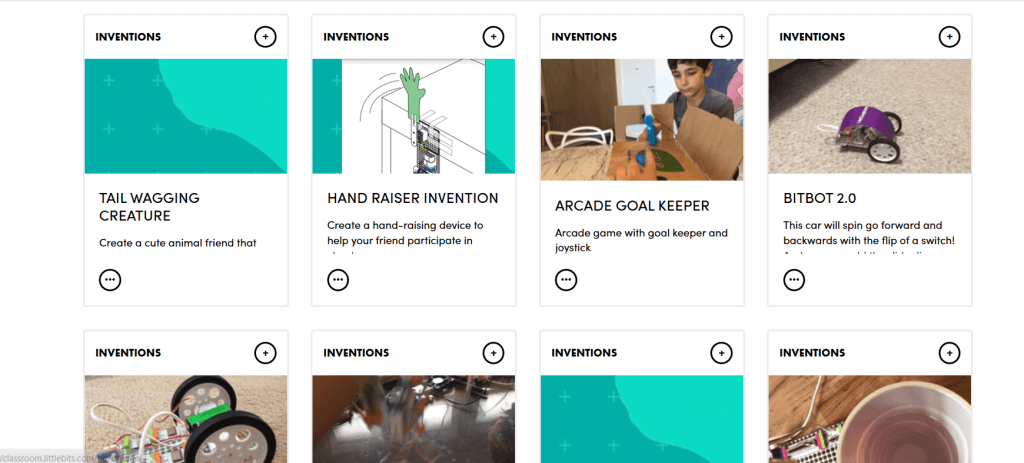
https://classroom.littlebits.com/explore/search?type=inventions

From the image above, there is an array of projects and builds to choose from and student’s own creations can be shared to the ever growing repertoire of inventions (Sphero, 2020).

Issues

Many of the issues that teachers have expressed revolved around the support or lack thereof for the implementation of this way of learning (Bower et al., 2018). Resources and funding would need to be heavily considered when teachers want to utilise the makerspace approach of learning which was also a major concern (Bower et al., 2018). Additional technical difficulties and troubleshoot could arise when designing tasks or executing them as with all technology (Bower et al., 2018). However with continual improvement of technology and a change in mindset over time, this new makerspace learning approach would be revolutionary.

Reference List

Bower, M., Stevenson, M., Falloon, G., Forbes, A., & Hatzigianni, M. (2018). Makerspaces in primary school settings: advancing 21st century and STEM capabilities using 3D design and printing.

Donaldson, J. (2014). The Maker Movement and the rebirth of Constructionism. Hybrid Pedagogy

Martinez, S., & Stager, G. (2014). The maker movement: A learning revolution. Learning & Leading with Technology.

Sphero, (2020). LittleBits Classroom. Retrieved from: https://classroom.littlebits.com/welcome

Week 8: Games for Education

Games in Learning

From: https://www.frogger.net/

This week will demonstrates the benefits of gaming in education for students through playing and designing.

Why games?

Squire, (2006) outlines that it is important for teachers to learn about games as they have the potential to become the next step in learning or an evolution of learning. Games are able to create multiple learning paths and are not chained by the constraints that that a real life classroom may have (Squire, 2006). In games students and learners are able to co-construct identifies, ideas, values and worlds in their own way without being taught to think in a preset way (Squire, 2006).

Furthermore, Prensky, (2008) adds that these games also provide students and learners a platform to develop crucial skills like creativity, critical thinking and problem solving. This can be achieved through students designing and building the games themselves as a majority of students feel the motivation through learning this way (Prensky, 2008). When students are actively engaged in designing a game that is relevant to the curriculum, it enables them to develop and improve their cooperative skills, increase motivation through personalisation, and imagination and creativity. Additionally, Prensky, (2008) states that learning takes place during game creation and students learn better when they are in charge and look forwarding to the process itself.

However, Kangas et al., (2017) addresses that teachers should keep in mind that planning and development of lessons and activities need to be effective and with clear goals for students to learn what they need against the curriculum.

Scratch

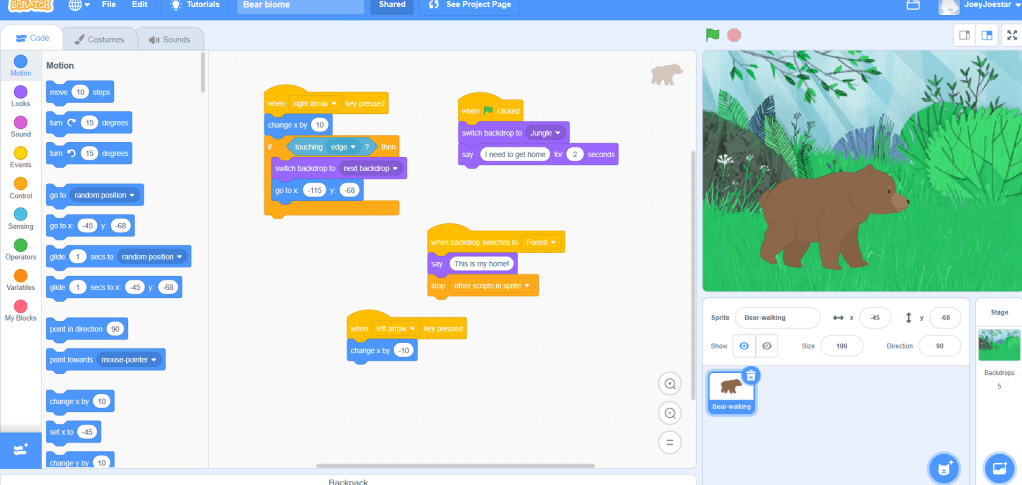
Scratch is an example of a tool that could help facilitate this design learning process for games and also has the ability to share these creations with anyone (Prenksy, 2008; Scratch, 2020). As seen below, students can create games, animations, stories, etc. for peers to try but it also provides them with an opportunity to think computationally and learning about coding blocks (Scratch, 2020).

Click the link below to try out the game that was created using this tool.

https://scratch.mit.edu/projects/392441675

Reference List

Kangas, M., Koskinen, A., & Krokfors, L. (2017). A qualitative literature review of educational games in the classroom: the teacher’s pedagogical activities. Teachers and Teaching, 23(4), 451-470.

Prensky, M. (2008). Students as designers and creators of educational computer games. British Journal of Educational Technology, 39(6), pp. 1004-1019. Retrieved from: https://onlinelibrary.wiley.com/doi/epdf/10.1111/j.1467-8535.2008.00823_2.x

Scratch, (2020). Imagine, program, share. Retrieved: https://scratch.mit.edu/

Squire, K. (2006). From content to context: Videogames as designed experience. Educational Researcher, 35(8), pp. 19-29. Retrieved from: http://website.education.wisc.edu/kdsquire/tenure-files/18-ed%20researcher.pdf

Week 7: Virtual reality

Virtual Reality

Above image from: https://www.mining-technology.com/features/featurereality-check-augmented-and-virtual-technology-in-the-mining-industry-4913055/

This week will focus on the wide range of applications of Virtual reality (VR) in education.

Why Virtual reality?

Similar to Augmented reality, Virtual reality can provide a sense of immersion through the use of sensory, symbolic and actionable activities (Dede, 2009). The potential affordances that come from VR can be greatly beneficial to learning when linked to curriculum tasks and used effectively (Dede, 2009). Lee et al., (2016) outlines that design of the virtual environment is crucial as pairing affordances to suit the learning outcomes of the curriculum will enhance student experiences and further engagement and motivation within students. Southgate, (2018), highlights that VR can provide constructivist learning through first hand experience, introduction of basic semantics, or more complex and abstract concepts that students would understand better if shown visually.

CoSpaces

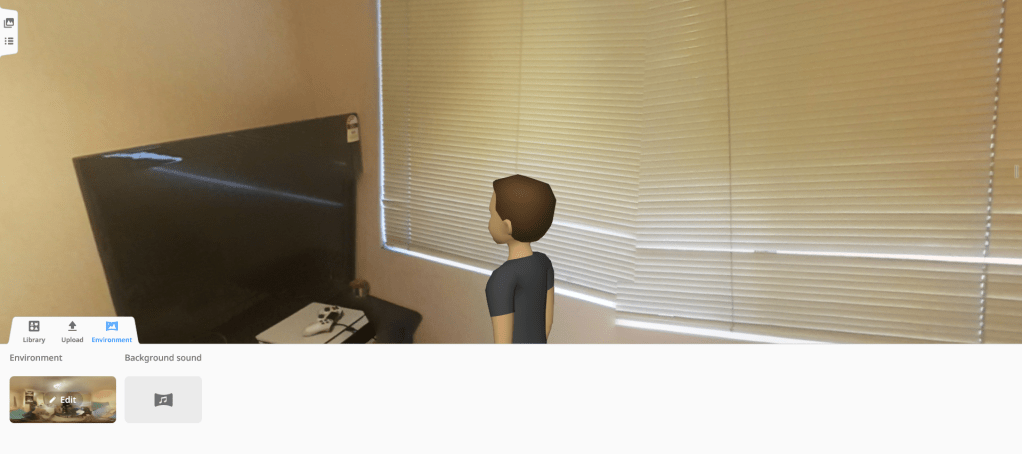
CoSpaces is a virtual and augmented reality educational tool that has a wide array of affordances for learning and pedagogy in the classroom (CoSpaces, 2020). Students are able to create 3D and 360 degree worlds via the website and are given the ability to design, construct, recreate, and share their works through virtual worlds or even virtual reality headsets (Southgate, 2018; CoSpaces, 2020). The collaborative aspect of CoSpaces, if implemented effectively in classroom activities, can allow for meaningful and engaging learning experiences.

The image below shows that students are able to upload their own 360 images to fill in for whatever environments they like and can even insert characters into the scene (CoSpaces, 2020).

By Jiacheng Lin

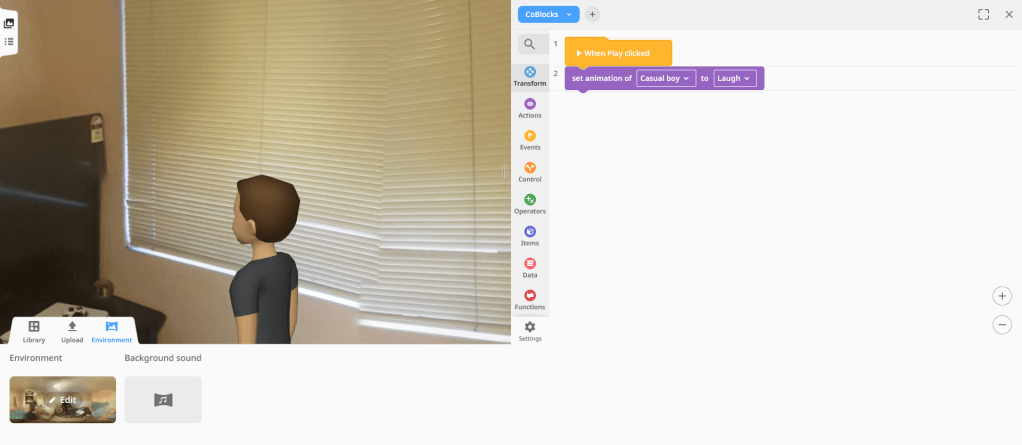
This second image below depicts the coding blocks option in which students are able to assign different animations for the characters to do in their constructed world (CoSpaces, 2020).

By Jiacheng Lin

The easily accessible and simple to learn CoSpaces tool is perfect for fostering student creativity and higher order thinking as their is a wide range of actions in the coding blocks to experiment with (CoSpaces, 2020;Lee et al., 2016).

Challenges

As with all technology, Virtual reality has issues such as the potential for technical issues to arise. Additionally, Southgate, (2018) addresses the healthy and safety concerns of using VR headsets such as psychological risks during long term immersions. However further research and improvement of VR can help mitigate these issues and its benefits will surely be of great use in future learning.

Reference List

CoSpaces. (2020). Make AR & VR in the classroom. Delightex. Retrieved from: https://cospaces.io/edu/

Dede, C. (2009). Immersive interfaces for engagement and learning. science, 323(5910), 66-69.

Southgate, E. (2018). Immersive virtual reality, children and school education: A literature review for teachers.

Lee, M., Tynan, Belinda, Dalgarno, Barney, & Gregory, Sue. (2016). Learning in virtual worlds : Research and applications / edited by Sue Gregory, Mark J.W. Lee, Barney Dalgarno, and Belinda Tynan. (Issues in distance education series).

Week 6: Augmented Reality

AUGMENTED REALITY IN EDUCATION

This week will focus on Augmented reality but more specifically about applications such as Zappar which can enhance engagement and learning experiences within the classroom.

Augmented Reality in the classroom

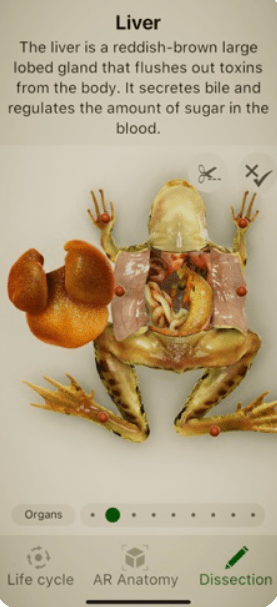
Bower, Howe, McCredie, Robinson and Grover (2014) argue that Augmented reality currently has many affordances which can be of benefit to classroom pedagogies. Augmented reality can allow the sharing of creations, that students have designed themselves, through easily accessible applications (Bower et al., 2014). Various applications for augmented reality are easily accessible and free on mobile phones and can help students conceptualise concepts, cut costs, and increase engagement (Akçayır & Akçayır, 2017). For example, the application Froggipedia enables students to visualize the anatomy of a frog and understand the inner workings at a deeper level without the need for real life samples to dissect (Designmate, 2020). The image below (from Froggipedia) shows how students can learn about the organs of a frog via this free to download app available on their phones and provides various other features for an engaging, fun an interesting time whilst in a science class (Bower et al., 2014; Designmate, 2020).

From: https://apps.apple.com/us/app/froggipedia/id1348306157#?platform=ipad
Zappar/Zapworks for creativity

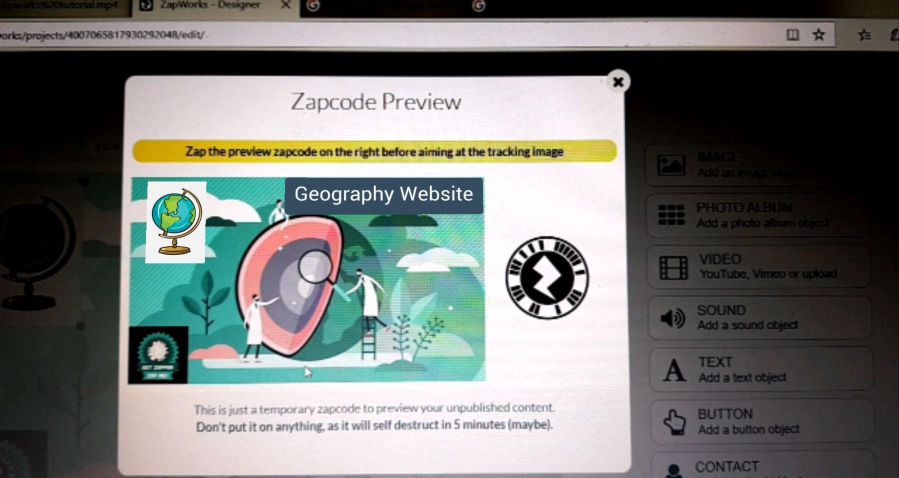
Students are able to create their own Augmented reality (AR) codes to scan with Zapworks and share with the class (Zapworks, 2020). Students can customize what the code or “trigger image” will show in Augmented reality for others to see with the website and all they need is to paste the zap code onto a corner of their image (Zapworks, 2020). With AR creation tools like these, they can foster student creativity and problem solving through higher order thinking e.g. designing 3D models or buttons for their peers to interact with on their phone (Bower et al., 2014). As Bower et al., (2014) encourages, these applications also bring meaningful learning to students as their own creations in AR ignite and motivate their interests in the subject they are learning.

Author: Jiacheng Lin
Issues

Akçayır & Akçayır, (2017) state that as with all technology, there are always technical difficulties that can arise with these Augmented reality applications. Aside from this, having these applications be accessed on a phone or other devices raises the concern of distraction as students could easily switch to something else on their phones whilst ignoring the task at hand (Akçayır & Akçayır, 2017).

Reference List

Akçayır, Murat, & Akçayır, Gökçe. (2017). Advantages and challenges associated with augmented reality for education: A systematic review of the literature. Educational Research Review, 20, 1-11.

Bower, M., Howe, C., Mccredie, N., Robinson, A., & Grover, D. (2014). Augmented Reality in education – cases, places and potentials. Educational Media International, 51(1), 1-15.

Designmate, (2020). Froggipedia. Retrieved from: https://apps.apple.com/us/app/froggipedia/id1348306157#?platform=ipad

Zapworks, (2020). Zapworks Designer. Retrieved from: https://zap.works/designer/

Week 5: Robotics

Robotics

Image from: https://www.sitech.co.nz/products/all/bee-bot-class-pack

This week will cover the benefits of utilising robotics in teaching for enhancement of learning, skills and creativity.

Why Robotics?

Robotics are programmable machinery that can allow students to manipulate different moving parts of the machinery for various different tasks (Jung & Won, 2018). These robotics can provide students with the skills for design, creation and programming needed in the 21st century (Merdan et al., 2020). Robotics present valuable methodologies for teachers to encourage and improve motivation of students through the meaningful tasks that they carry out through the student’s own programming (Merdan et al., 2020). These skills acquired from the experiences of these robots can translate and be applicable for their learning in STEAM subjects [science, technology, engineering, arts and mathematics](Merdan et al., 2020; Jung & Won, 2018).

Bee Bot

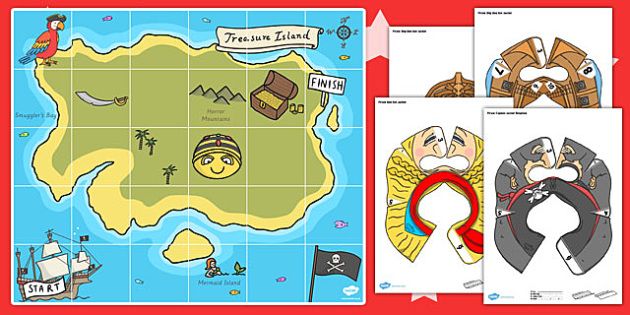
Bee bot is a great example of a robot which can be applicable in various subject areas; teaching problem solving skills, creativity and critical thinking whilst also covering curriculum (Alimisis, 2012) . The bee bot is capable of moving forward and backwards and functions to turn left or right through programmable buttons on the back (Terrapin, 2020). For example, in the subject area of geography, the bee bot can be programmed by students to move in certain patterns to reach the end goal in the map shown below (Terrapin, 2020). This would teach students about coordinates on a map, and other features of maps through visualisations, whilst exercising their problem solving and creative thinking to reach the finish line (Stefanos & George, 2019).

Treasure Map Bee-Bot Resource Pack
From: https://www.twinkl.com.au/resource/t-t-20568-treasure-map-bee-bot-resource-pack

Although Jung & Won, (2018) argue there are difficulties on this implementation of robotics due to lack of focus on pedagogy itself, there is potential in these robots such as bee bot to enhance student learning and equip the future generation with skills to address issues in the world. Jung & Won, (2018) suggests that the focus should be on the way we teach with the robotics which will enrich student learning and motivation such as meaningful learning.

Reference List

Alimisis, Dimitris (2012). Robotics in Education & Education in Robotics: Shifting Focus from Technology to Pedagogy. Robotics in Education Conference, 2012.

Jung, S., & Won, E. S. (2018). Systematic review of research trends in robotics education for young children. Sustainability, 10(4), 905.

Merdan, M., Lepuschitz, Wilfried, Koppensteiner, Gottfried, Balogh, Richard, & Obdržálek, David. (2020). Robotics in Education : Current Research and Innovations / edited by Munir Merdan, Wilfried Lepuschitz, Gottfried Koppensteiner, Richard Balogh, David Obdržálek. (1st ed. 2020. ed., Advances in Intelligent Systems and Computing, 1023).

Stefanos Xefteris, & George Palaigeorgiou. (2019). Mixing Educational Robotics, Tangibles and Mixed Reality Environments for the Interdisciplinary Learning of Geography and History. International Journal of Engineering Pedagogy (iJEP), 9(2), 82-98.

Terrapin. 2020. Bee Bot. Retrieved from: https://www.terrapinlogo.com/

Week 4: Computational Thinking

COMPUTATIONAL THINKING

This week we will be addressing the importance of computational thinking and how it enhances creativity within the classroom.

What is Computational Thinking?

Wing ,(2006) states that computational thinking is a computer science skill which is crucial to student’s learning and their analytical abilities. It is having the ability to design, problem solve and develop understandings of human behaviour through an abstract point of view (Wing, 2006). Wing, (2006) claims that these skillsets are universal and can be greatly beneficial as it is widely applicable to the future of children and students.

How do we teach computational thinking?

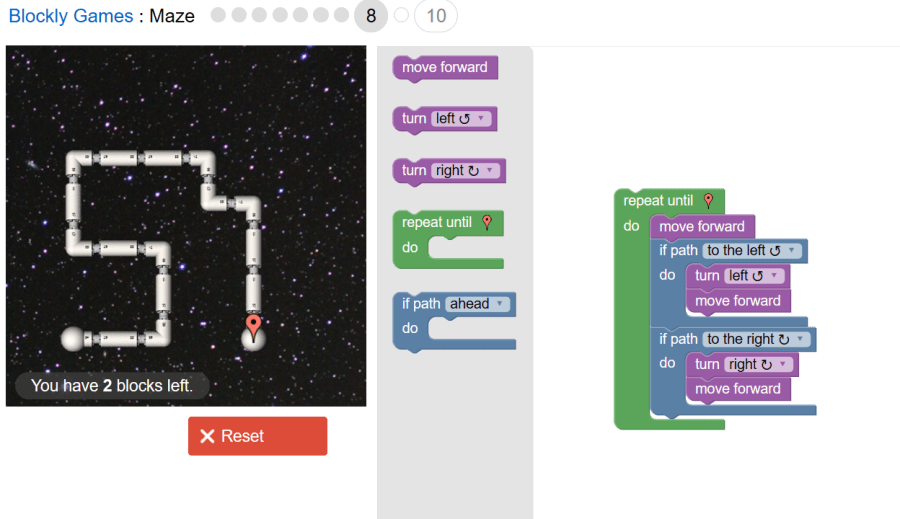
One great example of teaching students is through Blockly Games: Maze which teaches the basics of programing without the traditional lines of coding required (Blockly Games, 2020). Blockly games, (2020), introduces the player to simple tasks at first but after grasping the basics will introduce new tools to incorporate into the block coding to solve the puzzles presented in each level.

From: https://blockly.games/maze?lang=en

This coincides with the curriculum goals introduced by Computing at School, (2013) as they encourage learning and developing these skillsets at school. Computing at School, (2013), encourages students to understand what algorithms are; how they are developed and implemented on digital devices; and how programs like blocky games will take the code produced and execute the commands it is given. Then the next step is for the students to be able to design, create, fix programs that could execute commands or instructions in the physical or digital world and problem solve by deconstructing the issue into smaller parts (Computing at School, 2013). Blockly Games: Maze as shown above teaches these exact skills through the simple instructions and understanding first then moving toward application and abstract thinking as levels become more difficult (Blockly Games, 2020).

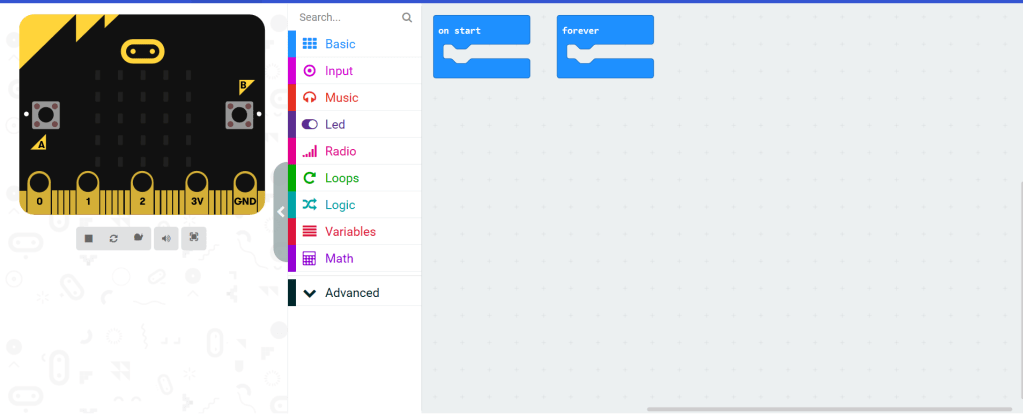
Furthermore these computational thinking skills can be developed through the use of micro-bits which are cheap and affordable minicomputers that teach problem solving and abstract thinking through programing and ICT (Micro:bit, 2020).

From: https://makecode.microbit.org/
Challenges of Computational thinking

The main challenge with this implementation is that, as teachers and students, we are not thought how to implement these activities with technology in a meaningful and effective way. However Computing at School, (2013), Wing, (2006) have provided the insight and strategies on how to approach teaching these skillsets by providing us with an understanding of its importance.

Reference List

Blockly Games. (2020). Maze. Retrieved from https://blockly.games/maze?lang=en

Computing at School (2013). Computing in the National Curriculum – A guide for Primary teachers. Retrieved from: http://www.computingatschool.org.uk/data/uploads/CASPrimaryComputing.pdf 

Micro:bit. (2020). Retrieved from: https://microbit.org/

Wing, J. M. (2006). Computational Thinking. Communications of the ACM, 49(3), 33-35.

Week 3: Design Thinking

DESIGN THINKING

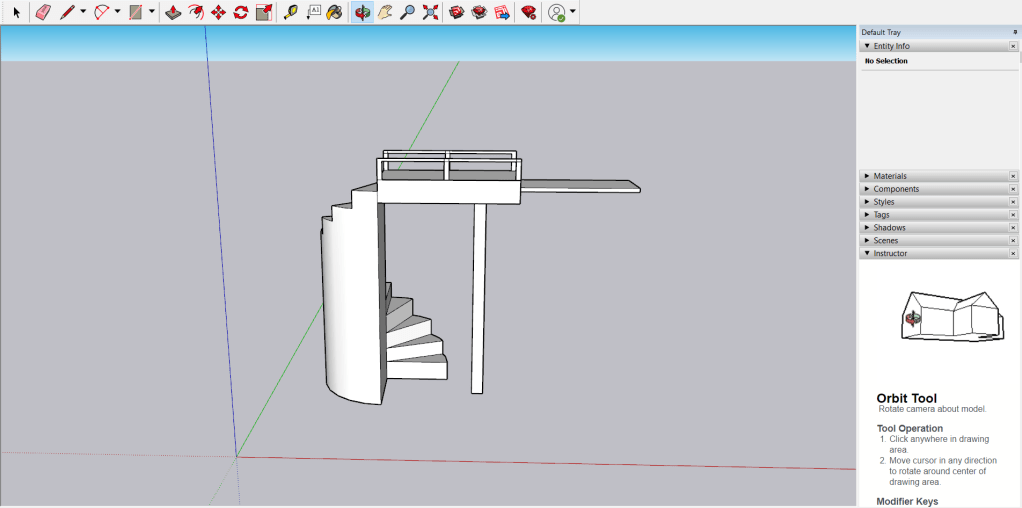
Image above retrieved from: https://www.sketchup.com/

This week will focus on Sketchup and how 3D design software can foster creativity in both educators and students.

Author: Jiacheng Lin
What is 3D design software?

3D design software like Sketchup enable the creation of 3-Dimensional objects through various tools shown in the image above (Sketchup, 2020). Students can utilise this tool to design vast amounts of 3D objects that can be used for architecture, video games, film and engineering. These objects enable students to conceptualise ideas through visualisation and to move beyond pen and paper to think critically and creatively (Kwon, 2017; Laurillard, 2012).

Why design?

As IDEO, (2012) states design thinking is crucial for educators as they are constantly designing lessons, planning and creating to help enrich and enhance learning for their students. However students can also benefit from the development of design skills for their future as they can work along side their teachers to ideate, critically think and problem solve when faced with challenges in the world (IDEO, 2012). As Kwon, (2017) would state, the world is constantly in a state of change and the skills that come from design are invaluable in the technology filled future.

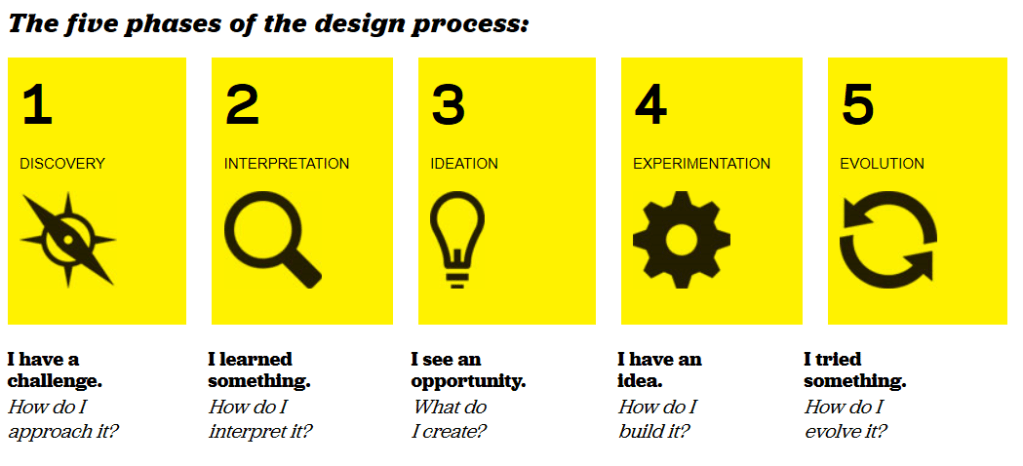
IDEO, (2012) portrays design thinking as a constantly improving procedure both teachers and students can take to achieve a positive impact on the challenges of the world. These procedures include:

Author by: IDEO, (2012)

And through these procedure, the crucial thinking skills are developed and fostered both in educators and students going into the ever evolving and forward thinking 21st century (IDEO, 2012). Tools like Sketchup can provide teachers with ways to engage students with the curriculum and to develop these design skills needed for the 21st century. Research from Kwon, (2017) has shown that 3D design software and 3D printing paired together as activities for a class proved to be effective in creating motivation, engagement, and valuable thinking skills for many subject areas such as science, technology, engineering, and maths.

By following the 5 steps of the design process, students can utilise Sketchup to design solutions to problems and keep improving upon each iteration (IDEO, 2012). These same skills can apply to teachers when designing lessons for their students (Kwon, 2017; Laurillard, 2012).

The Challenges

The main challenges with implementing design thinking in the classroom is the need for teachers to align these tasks with the curriculum and a school’s willingness to change. Many schools have cemented the high stakes testing culture into their systems and change can be difficult (Koh, Chai, Wong, & Hong, 2015). The other major issue is the need for scaffolding for both teachers and students as designing is mentally demanding and most are unsure of the proper way to implement tasks to foster the creativity and design thinking skills (Koh et al., 2015).

Reference List

IDEO (2012). Design Thinking for Educators (2nd Edition).

Koh, J., Chai, Ching Sing, Wong, Benjamin, Hong, Huang-Yao, SpringerLink, & SpringerLINK ebooks – Humanities, Social Sciences Law. (2015). Design Thinking for Education : Conceptions and Applications in Teaching and Learning / by Joyce Hwee Ling Koh, Ching Sing Chai, Benjamin Wong, Huang-Yao Hong.

Kwon, H. (2017). Effects of 3D Printing and Design Software on Students’ Overall Performance. Journal of STEM Education : Innovations and Research, 18(4), 37-42.

Laurillard, D. (2012). Teaching as a Design Science: Building Pedagogical Patterns for Learning and Technology. Routledge.

Sketchup. (2020). 3D Design Software. Retrieved from: https://www.sketchup.com/

Blog at WordPress.com.

Up ↑

Design a site like this with WordPress.com
Get started